
Themes & Appearance
DSH Terraria Theme
10086ggqq/dsh_theme_terraria · ★ 30
 10086ggqq
Apply a Terraria-inspired pixel interface and desktop skin to the DSH Web interface.
Manifest details
安装
dsh plugin --profile web add 'github:10086ggqq/dsh_theme_terraria#27f64d5c86ef150390c4c937c3850534dede36e6'GitHub 源码安装:首次需按提示配置 allowBuilds 构建授权后重试
For install and environment setup, plus plugin development tutorials, see DSH community docs ↗
README
Table of contents
- Table of Contents
- 1. Overview & Core Positioning
- Core Mapping
- 2. Installation & Deployment Guide (with Pitfalls)
- Requirements
- Installation (standard plugin install)
- How it applies inside the Desktop (Electron) app
- Configure the API Key and Start Chatting
- Pitfall Guide (All Field-Tested)
- 3. Visual Design System (UI/UX Details)
- Design Language: Pixel Triad + Slate Texture
- Typography
- Title Screen
- Main Chat Interface (Three-Column Layout)
- Chat History: Paging, Anchor Navigation, Markdown
- Mode Select Modal: 1:1 Character-Creation Recreation
- Settings Modal & Wallpaper System
- Plugin Manager (search / inspect / install / enable / remove)
- Continue-Session Modal: Workspaces as Parents, Sessions as Children
- Workspace Modal
- Desk Pet
- 4. Sound Interaction System (Audio Feedback)
- Background Music (Custom BGM)
- 5. Hidden Easter Eggs (Narrative Interaction)
- 6. Performance & Accessibility Guardrails
- Performance
- Accessibility Guardrails
- 7. Project Maintenance (Uninstall, Structure & License)
- Repository Structure (a standard dsh plugin package)
- Plugin Spec Essentials (apply(ctx) and how it loads)
- Common Maintenance Commands
- Uninstalling (Restore the Official UI)
- Submitting to dsh-plugin.org
- License
Replace the DeepSeek Harness Web UI with an entire Terraria-style pixel world — the Guide codes alongside you.

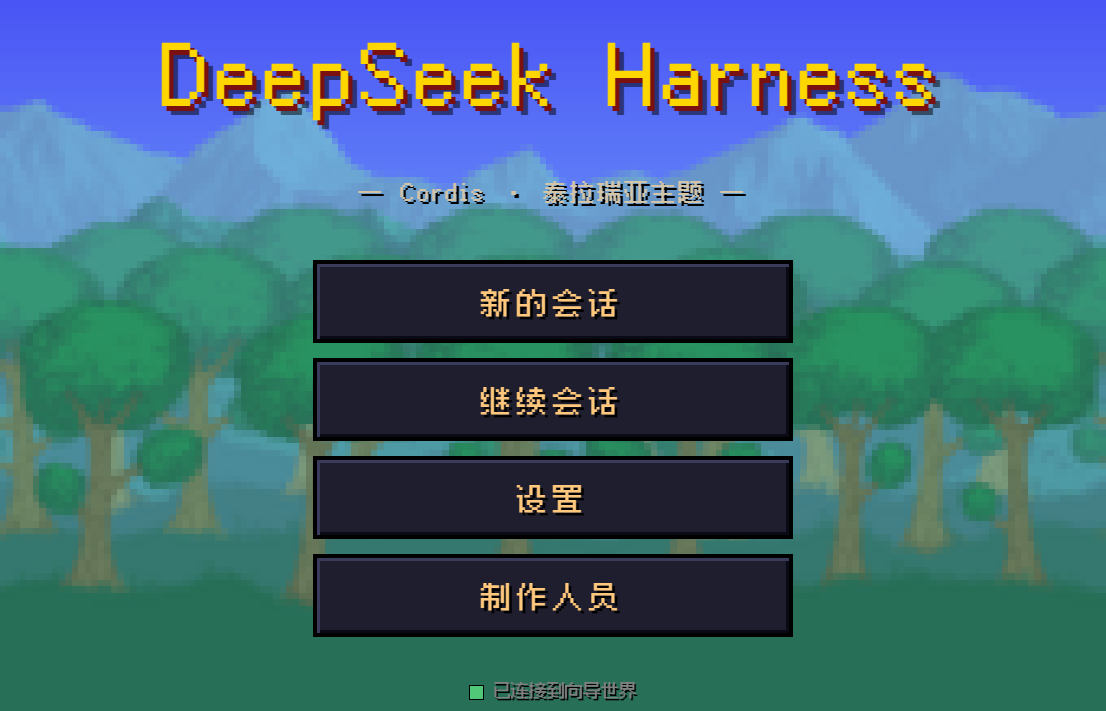
Table of Contents
- Overview & Core Positioning
- Installation & Deployment Guide (with Pitfalls)
- Visual Design System (UI/UX Details)
- Sound Interaction System (Audio Feedback)
- Hidden Easter Eggs (Narrative Interaction)
- Performance & Accessibility Guardrails
- Project Maintenance (Uninstall, Structure & License)
1. Overview & Core Positioning
dsh_theme_terraria (npm package name dsh-theme-terraria) is a Terraria-themed plugin for DeepSeek Harness (dsh). It replaces the official React frontend with a single self-contained index.html (~98 KB, zero external JS dependencies), wrapping the "AI coding agent console" as a pixel adventure:
- A standard dsh plugin package: this repository is itself an npm package — the entry
index.jsexports theapply(ctx)required by the plugin spec,cordis.patch.ymldeclares thedsh.bundlepatch layer, and a singledsh plugin --profile web add dsh-theme-terrariainstalls or removes it without touching any file in the dsh installation. - Not a mere skin: the theme talks directly to the dsh host over JSON-RPC (HTTP upstream) + WebSocket (event downstream). Session creation, message sending, streaming output, tool approvals, model switching, and workspace management are all fully functional. Enter a DeepSeek API key and you can chat with the model for real.
- Four difficulty tiers = four agent presets: Journey (standard, full-featured coding agent), Softcore (code, Code Mode SDK), Mediumcore (minimal, bare dual-tool agent), Hardcore (cordis, custom preset template). Switching difficulty switches the preset — the plugin composition changes live with it.
- Single-file delivery: the entire UI is inlined in one HTML file served directly by the plugin — no runtime framework, no build step.
Core Mapping
| Official UI concept | Terraria theme mapping |
|---|---|
| Agent Preset | Difficulty tier: Journey / Softcore / Mediumcore / Hardcore |
| Session | Journey / Adventure |
| User message | Adventurer |
| Tool approval request | Approval tablet |
| Todo list | Quest HUD |
| API key status | Life crystal indicator |
| Plugin composition | Equipment that changes with difficulty |
2. Installation & Deployment Guide (with Pitfalls)
Requirements
- An installed dsh (DeepSeek Harness) CLI —
dsh --versionworks in your terminal - Node.js
^22.19 || >=24and pnpm (dsh pluginforwards to pnpm for dependency management) - A DeepSeek API key (required for chatting; all other UI works without one)
Installation (standard plugin install)
# 1. Install the theme as a plugin into the web profile
dsh plugin --profile web add dsh-theme-terraria

# 2. Start the web server
dsh web
# Default URL: http://127.0.0.1:3080/
dsh plugin add writes dsh-theme-terraria into the web profile's dependencies and dsh.profile.bundles layer list; the plugin's cordis.patch.yml patch layer disables the official web-runtime row and inserts an identical terraria-theme row, while the plugin entry index.js — which exports apply(ctx) — points the official @deepseek-ai/dsh-web-app frontend resolver at this package's web/index.html. Everything else the official Web runtime owns (dist serving, the /api trust fence, DSH_WEB_URL, the URL line) keeps working unchanged.
Before the package is published to npm
# Install from the GitHub repository
dsh plugin --profile web add github:10086ggqq/dsh_theme_terraria

# Or install from a local checkout of this repository
dsh plugin --profile web add /path/to/dsh_theme_terraria
When running dsh from source inside the deepseek-harness repository, prefix the commands with
pnpm(e.g.pnpm dsh plugin --profile web add ...,pnpm dsh web).
How it applies inside the Desktop (Electron) app
The Desktop window has two hard constraints: it loads dsh-app://app/, and that protocol maps /,
/index.html, /assets/*, /favicon.svg and /manifest.webmanifest to the frontend bundled inside
the application — the dist served by the Host is never requested there. Only other paths are forwarded
to the Host together with its cookie.
So the plugin takes two routes:
- Full takeover (default): the injection layer preflights
/terraria/theme.html(which servesweb/index.html) and then navigates the window there — the Desktop window runs the very same UI as the web version (title screen, Guide dialog, character creation, quest HUD, 8-bit sounds, wallpapers, desk pets)./api/*keeps flowing through the Desktop shell with the Host cookie, and the WebSocket connects to the Host origin taken from__DSH_TRANSPORT__.streamBaseUrl. - Fallback skin: when the theme page is unavailable (missing route / failed preflight) or the
takeover is switched off, the official UI gets an injected pixel skin (
skin/terraria.cssoverriding the official--dsw-*tokens and generic element styles).
Desktop-only adaptations: native caption colours (the preload reads the page's --dsw-* tokens), a
40 px title-bar reservation, and -webkit-app-region: drag on the top bar and title screen — with
every interactive element marked no-drag, because app-region is a hit test, not a stacking
order. Modal overlays (#modal-root) are no-drag too, and while a modal is open the page sets
data-terraria-modal to drop the drag regions underneath it; otherwise the full-window title-screen
drag area swallows every click on the overlay (the "关闭" buttons of Continue / Desk Pet looked
dead). Esc closes a modal as well.
- Quit the application completely and relaunch it: the injection rows are a one-shot snapshot taken when the Host starts, so reloading the window or reloading the plugin will not pick up new rows.
- Way out: "切回官方界面" on the theme title screen, or Alt+O. On the Host side,
DSH_TERRARIA_STANDALONE=0disables the takeover andDSH_TERRARIA_SKIN=0disables the fallback skin. - The way out works both ways: "切回官方界面" writes
localStorage['terraria.takeover'] = '0'and stays in effect across restarts, so once you are back on the official UI a "🌳 泰拉瑞亚主题" pixel button sits in the bottom-right corner (or press Alt+T); it clears the flag and takes the window back. Every decision is recorded inlocalStorage['terraria.inject']— check that first when the UI looks wrong.
Configure the API Key and Start Chatting
- Open http://127.0.0.1:3080/ and click "新的会话" (New Session);
- The first visit automatically opens Settings — type your
sk-...key into the "DeepSeek API 密钥" field and click "保存密钥" (Save Key); - The key is stored on the host machine via
credentials.set(.dsh-home/.credentials.yaml); the page itself never persists the plaintext key; - Once the HUD shows "API 密钥:已配置" (configured), type any instruction into the dialog to start a real conversation.
Pitfall Guide (All Field-Tested)
| Pitfall | Symptom | Fix |
|---|---|---|
| Desktop window shows a "warm parchment official UI" instead of Terraria | Pixel palette and pixel font are there, but the layout is the stock one (sidebar "插件 / 自动化任务", "探索未至之境" in the middle); restarting does not help | Rendering is fine — the takeover is switched off. localStorage['terraria.takeover'] = '0' (written by "切回官方界面" / Alt+O) persists forever. Click the "🌳 泰拉瑞亚主题" button in the bottom-right corner, or press Alt+T; or run localStorage.removeItem('terraria.takeover'); location.reload() in DevTools. When it still refuses, read localStorage['terraria.inject'] — it records which step bailed out |
| Desktop app window does not show the theme | Plugin says "running" but the window stays official | The Desktop window never requests the Host dist; since 0.2.0 the injection layer takes the window over to the theme page. Injection rows are a one-shot snapshot at Host start, so quit the app completely and relaunch (reloading the window or the plugin is not enough). If the takeover is unavailable, it falls back to "official UI + pixel skin" |
| Theme page loads but never connects | Status keeps reconnecting | Use "切回官方界面" on the theme title screen, or Alt+O, to get a working UI back, then send the console error |
| Browser caches old UI | Page still shows the old version after a plugin update | Hard refresh with Ctrl+F5, or append ?v=2 to the URL |
dsh plugin add fails |
pnpm not found on PATH or a pnpm error |
dsh plugin forwards to pnpm: install pnpm and reopen the terminal; for git installs, follow the printed hint and add the key under allowBuilds in the profile's pnpm-workspace.yaml, then re-run |
| Key save fails | Toast reports "保存失败" | Make sure dsh web was started from your own terminal; sandboxed environments may block host-directory writes |
| Image wallpaper won't store | "图片过大,保存失败" | localStorage caps around 5 MB; the theme already compresses non-GIF images to 1920px JPEG. If it still fails, use a smaller image or a video wallpaper |
| Folder picker returns no full path | Only the folder name appears after selecting | Browser security restriction (uniform across the web). The theme smart-fills registered same-name directories via a "使用 E:\full\path" button; otherwise it prompts for manual completion |
| WebSocket drops | Top bar shows "连接已断开,重连中…" | Normal auto-reconnect (2s interval); if the host process exited, restart dsh web |
3. Visual Design System (UI/UX Details)
Design Language: Pixel Triad + Slate Texture
The visual foundation is three layers:
- Background layer: default forest wallpaper (
forest.png) with the title-screen tree (Tree.png);image-rendering: pixelatedkeeps pixels crisp. User-replaceable (see wallpaper system). - Panel layer: every card/modal uses the "Terraria slate" style — nested deep-blue double layers (outer
#181e58, inner#2e3692), 3 px dark outlines (#0e1340), 8 px corner radius, bold serif (SimSun/Songti SC). - Accent layer: gold (
--gold) for titles and highlights, torch orange (--torch) for section headers, parchment white (--parchment) for body text, with a dark drop shadowtext-shadow: 1px 1px 0 var(--black).
Typography
- Primary: Fusion Pixel 12px (an open-source CJK pixel font), a single ~600 KB
woff2bundled inweb/— crisp CJK rendering; - Modal titles: bold SimSun, recreating the game's dot-matrix feel;
- Monospace: the terminal panel renders tool output in monospace.
Title Screen
A faithful recreation of the game's main menu: logo, five pixel menu items (New Session / Continue / Plugin Manager / Settings / Desk Pet), and the big tree silhouette over the forest background.
Main Chat Interface (Three-Column Layout)
- Top bar: back button, session name (the current workspace name, e.g.
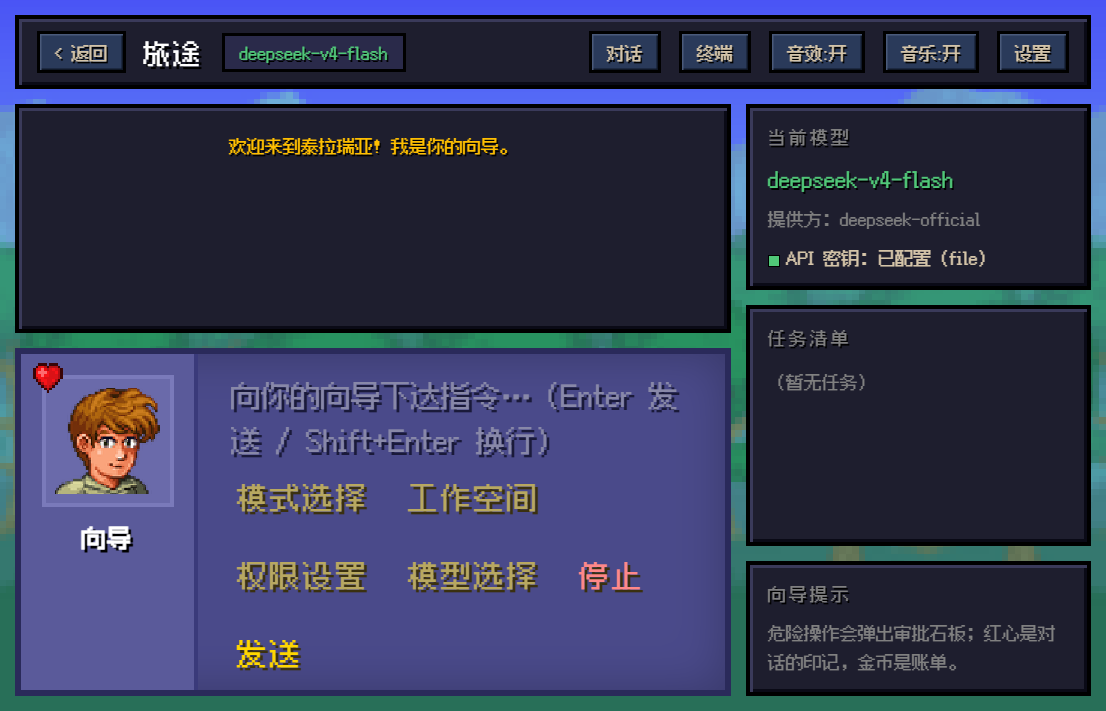
dsh_theme_terraria; sessions without a workspace fall back to the mode name), connection lamp ("已连接到向导世界" — connected to the Guide's world), Chat/Terminal tab switch, sound toggle, music toggle, plugin manager, settings entry. The model name lives in the HUD's "当前模型" only — the top bar no longer repeats it as a badge; - Chat column: message stream (Adventurer = user, Guide = assistant) plus the bottom NPC dialog box — Guide portrait (
xiangdao.png) and heart emblem (heart.png) on the left, input box and seven pixel buttons on the right: Attach, Mode Select, Workspace, Permissions, Model Select, Stop, Send. A turn leaves one "process" line plus one result reply: reasoning text, tool calls and intermediate step prose ("Now the endpoint mapping:"-style transition lines) all fold into one collapsible process block — expanded while the turn runs so progress stays visible, collapsed at turn end into a summary such as "过程 · 已思考 1.1k 字 · 7 次工具 · 3 段中间说明 · 24s". The stream therefore holds only your messages, one process line per turn, and the result bubble. Steps without prose leave no bubble at all (they used to leave bricks containing nothing but a token line or "已思考 · N 字"); - Reasoning lives inside the process block: expand the summary line to read the raw thinking (tagged "已思考 · N 字") and every tool call; tool activity is mirrored to the Terminal tab as before. While running, a single "••• 正在思考…" line is all that shows;
- No
tokens:line under replies: the old per-reply usage line is gone, so no token copy appears in the message stream — token stats live in the HUD's rate panel only; - HUD sidebar: current model (name + description), API key status lamp (the login role is reported here too — status only, with no sign-out entry; that button lives in the settings modal's login-role row), quest list (live todo projection), Guide tips with a token output rate readout (live tok/s + this turn's tokens + session average + a mini bar chart) — the one and only place token usage is shown (every step's
outputTokensaccumulates here).
Chat History: Paging, Anchor Navigation, Markdown
- History paging (your own prompts survive "Continue"): the
session/followsnapshot is only a window (measured ~300 records, sometimes just the latest prompt), soloadHistory()keeps paging backwards withsession/page(throughSeqinclusive /beforeSeqexclusive) — four pages automatically, and a "⬆ 加载更早的历史" button (up to 12 more pages / 6000 records) at the top of the stream and in the navigation panel. Records are re-rendered in chronological order and the scroll position is preserved by height compensation; - Anchor navigation: "≡ 导航" in the top-right corner of the chat opens a panel listing the results as anchors (Adventurer = each of your prompts, Guide = replies that actually have text, with a preview); clicking one scrolls to it and flashes a gold border. It has a text filter, jump-to-oldest/newest buttons, and auto-highlights the message you are currently reading while scrolling;
- Results only: intermediate steps that carried just a thinking block or a tokens line (no reply text) are not listed in the history panel, so the list never fills up with un-jumpable noise;
- Markdown rendering: assistant replies render as Markdown (headings, bold/italic, inline code, fenced code blocks with a copy button, quotes, ordered/unordered/task lists, tables, rules, links, images) and keep rendering live while streaming. Everything is HTML-escaped before parsing, so model output can never inject markup; user messages stay plain
pre-wraptext.
Mode Select Modal: 1:1 Character-Creation Recreation
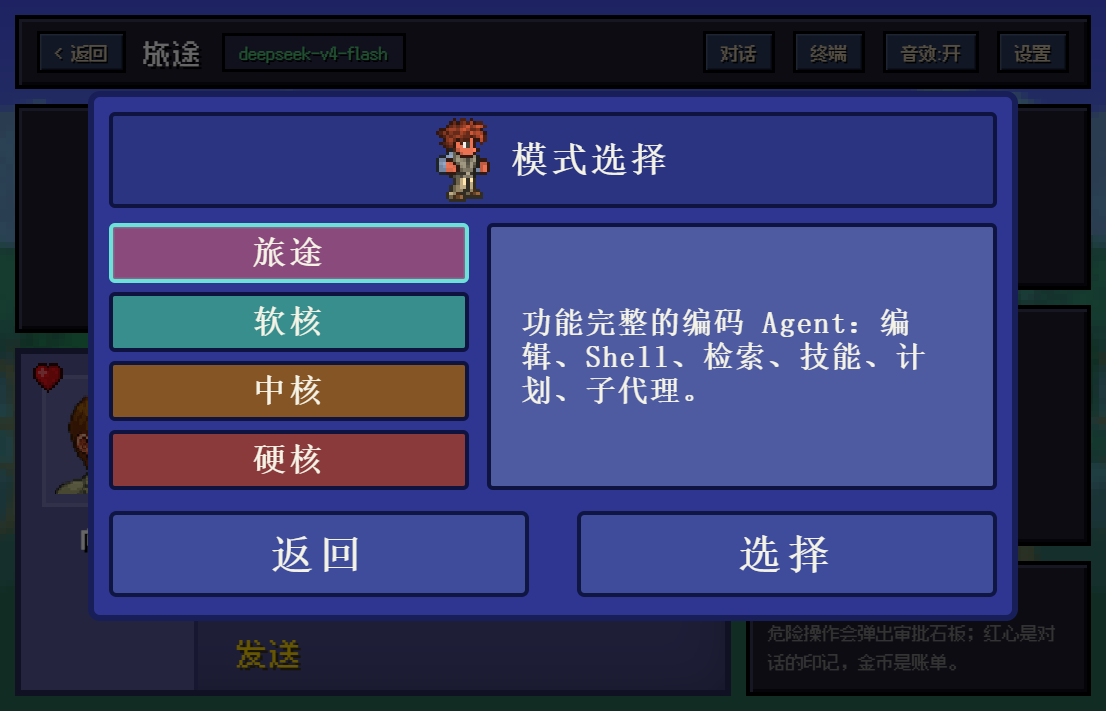
Clicking "模式选择" opens a character-creation-style modal — the most faithful recreation in the whole theme:
- Top bar: walking character gif (
Style_1_male_walking.gif) + "模式选择" title; - Left column: four difficulty buttons in their in-game colors — Journey (purple
#8a4b7c), Softcore (teal#388e8d), Mediumcore (brown#855526), Hardcore (red#8a3a3b); - Selected state: bright cyan frame (
#6be1d8) with an inner glow stroke; - Right panel: live description of the selected difficulty's real preset;
- Bottom "返回 / 选择" (Back / Select) buttons with a
scale(0.96)press feedback; - "选择" actually calls
agentPreset.selectto switch the backend preset; the session name updates accordingly.
Settings Modal & Wallpaper System
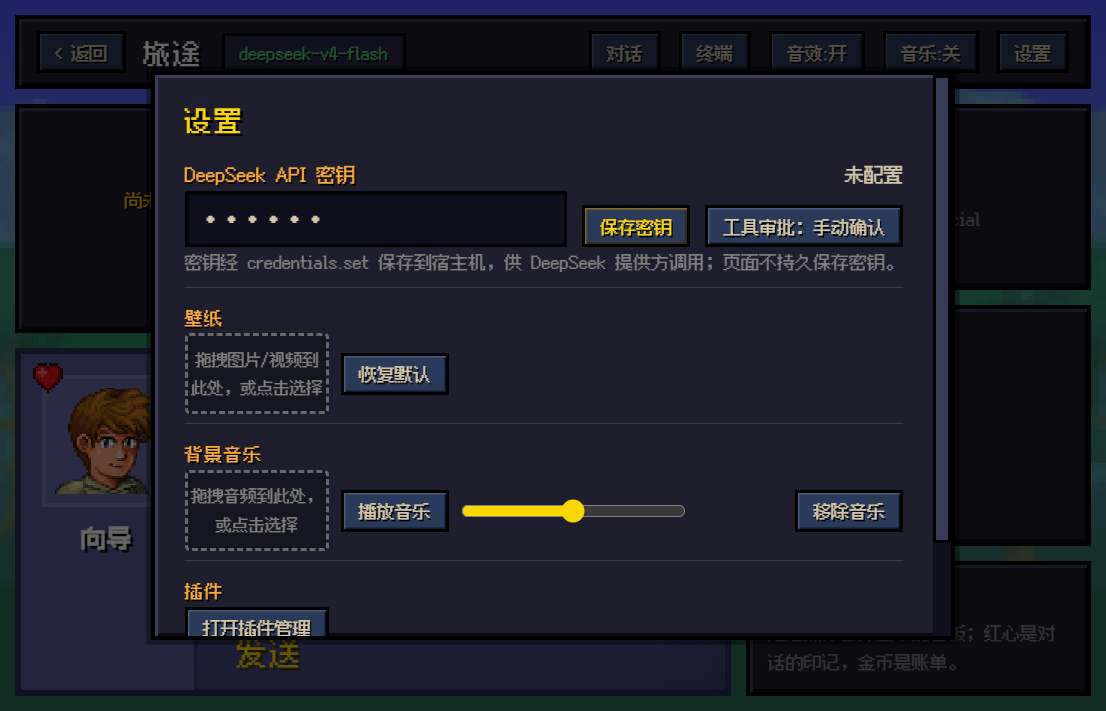
The settings modal has four sections:
- Login role (row 0,
#set-role/#set-role-detail): which identity is running — "DeepSeek 账号 · 已登录 · " or "API 密钥 · 未登录 DeepSeek 账号,用密钥直连", plus a line noting that account credentials are kept by the host and used automatically (no API key needed). The snapshot comes from the same-originGET /terraria/account. While signed in with an account this row also carries a "退出登录" (sign out) button (#set-signout, a danger-styled small button): it first asks for confirmation (queryingaccount/hasRunningAccountTasksso the copy can warn that running tasks will be interrupted), then calls the host'saccount/signOutwith the client identity{version, locale, timezoneOffsetSeconds}— the same endpoint the official frontend uses. The host deletes the local account grant and revokes it through Platform in the background; API keys are untouched. Afterwards the page polls/terraria/accountuntil the role is no longer an account and refreshes the role row and the HUD lamp. The button is hidden in API-key mode (there is no login to end), and it lives only in the settings modal — the chat page (HUD / top bar) never shows it; - API key: an orange "DeepSeek API 密钥" heading with the config status on the right; the password input sits on the left (start position and height unchanged, width adapts), with the gold "保存密钥" (Save Key) button and the tool-approval mode switch (auto-allow / manual confirm) to its right on the same row, all bottom-aligned; stored on the host via
credentials.set; on narrow screens the buttons wrap below instead of covering the input; - Wallpaper: dashed drop zone "拖拽图片/视频到此处,或点击选择" — supports both drag-and-drop and click upload; images are auto-compressed to 1920px JPEG for localStorage, GIFs keep their animation as-is, and videos (MP4/WebM, ≤512 MB) are stored in IndexedDB as fullscreen live wallpapers (muted, looping, behind everything); "恢复默认" restores the forest in one click;
- Background music: dashed drop zone "拖拽音频到此处,或点击选择" — drag or click to upload any audio file (MP3/WAV/OGG etc., ≤64 MB), stored in IndexedDB and looped as BGM; comes with a play/pause button, a volume slider, and "移除音乐" (remove); the top-bar "音乐:开/关" (music on/off) toggles it anytime;
- Interface: reload the UI (the desktop shell has no refresh shortcut) and open the plugin manager.
Plugin Manager (search / inspect / install / enable / remove)
The top bar's "插件管理" (also on the title screen) opens the plugin dialog, talking to the host's pluginManager service:
- Search: asks the public npm registry directly (
registry.npmjs.org/-/v1/search, CORS-enabled) and ranks dsh-related hits first; an empty query searcheskeywords:dsh-plugin. When search is unavailable it tells you to paste a package name instead; - Local / Git source install (for everything search cannot find): a spec input with "选择文件夹…" (the desktop shell's native picker returns the host's absolute path), "选择 .tgz…" (
__DSH_HOST_PATHS__.pathFor), and drag-and-drop of a folder onto the row. Every host spec form is accepted — an absolute path (D:\code\my-plugin, must contain package.json), a*.tgz(local or URL), a git repo (github:you/repo,https://github.com/you/repo,git+https://…,git@host:path) and a registry name (optionally with@version). Local paths must be absolute:file:///D:/…and relative paths are refused by the host (measured:not-a-package: the path does not exist/invalid-spec: a local path must be absolute); - Inspect:
pluginManager/inspectresolves a spec (package name, npm alias, git URL, local path, tarball) and reports whether it is a bundle, plus version and description; refusals show theproblemand the raw reason (e.g.not-found+ registry text, oralready-installed); - Install:
pluginManager/installBundle(with a client-mintedrequestIdandenabled: true); the outcome is reported byapplication(applied / restart-required / failed) with error code, diagnostic and the tail of the pnpm output. The log area also collects the host'splugin-manager/install-logevents; - Installed:
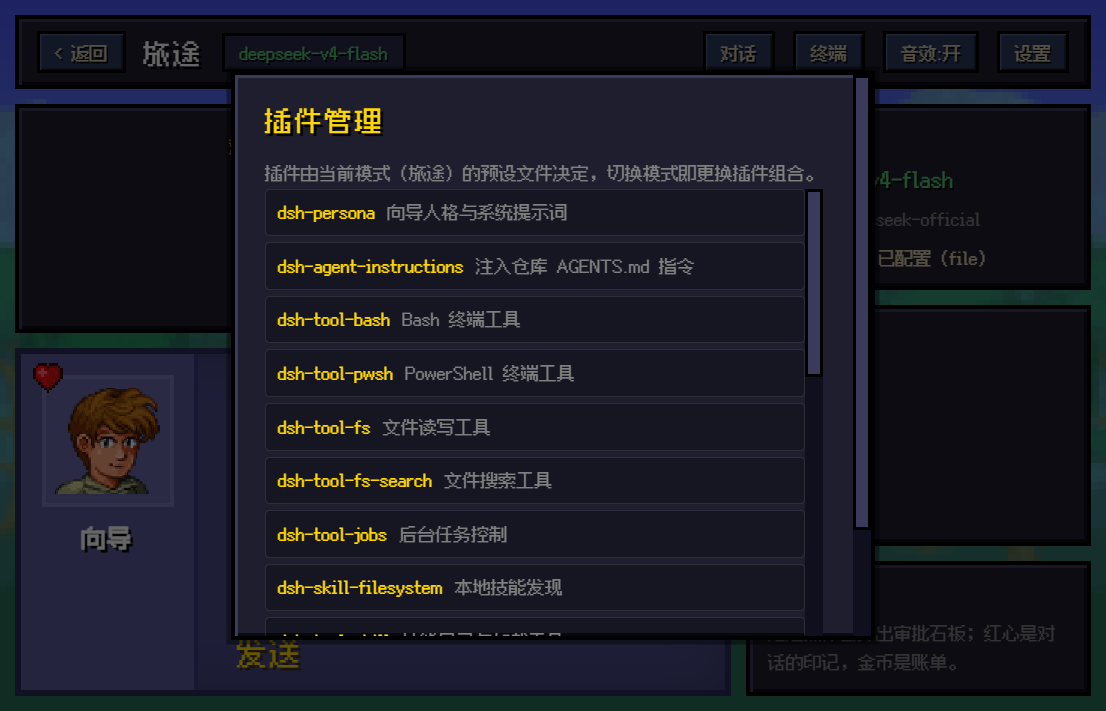
pluginManager/listBundleslists every bundle grouped by origin, and both groups fold — Personal (declared in the current profile's dependencies, installed by you, disable / remove) is expanded by default, Official (shipped with the dsh installation, disable-only) is collapsed by default and opens automatically when the Personal group is empty. Each row can be enabled / disabled (setBundleEnabled) and, when removable, removed (removeBundle); double-click any row to open the plugin detail page; - Plugin detail page: name @ version, title, origin (Personal / Official), state, removability (built-in, or protected by
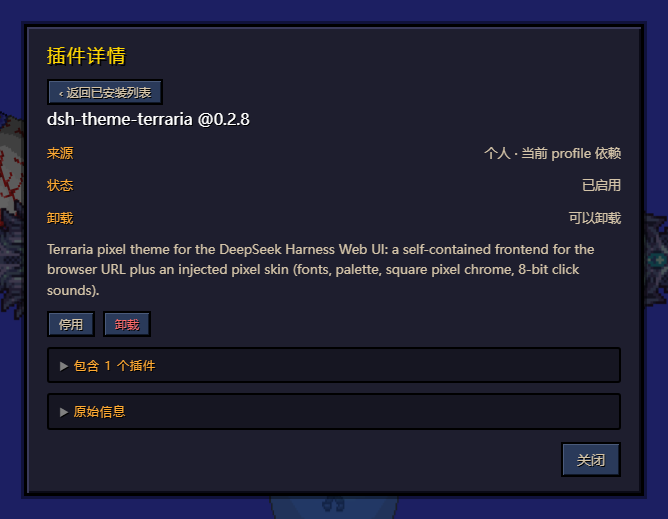
management-required), optional-bundle flag, error code and description; below that, "Contains N plugins" (each module name, its Chinese note, whether it is running) and "Raw info" (the bundle JSON) — both collapsed by default and opened on click. Enable / disable / remove also work from the detail page and refresh in place; removing the plugin drops you back to the list; - Registry: shows what
pluginManager/registriesresolved (hereregistry.npmjs.orgwithregistry.npmmirror.comas fallback); - Current preset inventory: the old settings-page cordis.yml inventory moved here, tucked into a collapsed-by-default section (with a count in its title); expanding it still offers the raw preset file for comparison.
Why plugins that live on GitHub do not show up in the search
The search queries the npm registry index, not GitHub:
- A repo that was never published to npm has no registry metadata at all, so it cannot be found (the host's
inspectanswersnot-found); - Packages that are published but have no
dshkeyword in their name/description rank far down, because search is relevance-ordered rather than a precise filter; - Packages that live in a private registry / internal mirror are invisible to the public one (this machine resolves
registry.npmjs.orgwithregistry.npmmirror.comas fallback); - Scoped packages (
@you/pkg) usually need their exact name.
Installing is unaffected: paste the repository into "本地 / Git 来源安装"
(https://github.com/you/repo, github:you/repo — inspect reports {status:"accepted",kind:"git",host:"github.com"}),
use an absolute path for a local checkout, or point at a *.tgz; pnpm clones, unpacks and installs the dependencies itself.
Continue-Session Modal: Workspaces as Parents, Sessions as Children
"继续会话" on the title screen lays the sessions out as a folder tree (it aligns session/list with workspace/follow):
- Parent node = workspace: the header row shows the workspace name (e.g.
dsh_theme_terraria) + full path + session count, and clicking it collapses/expands the node (▾ / ▸); - Child node = "第 x 个对话": children are ordered by most recent activity, so #1 is the newest; each row carries the session title, timestamp, a
运行中(running) tag and the working directory; - Archive: every session row ends with an "归档" button calling
workspace/archiveSession(a running session has its activity stopped as well). Archived sessions leave the tree and move into a collapsed "已归档" parent at the bottom, where each row offers "取消归档" (workspace/unarchiveSession) to put it back; - Ownership comes from the workspace's
sessionIds, with acwdmatch as fallback; sessions covered by neither are grouped by theircwdtail, and those without acwdland under "未归入工作空间".
Workspace Modal
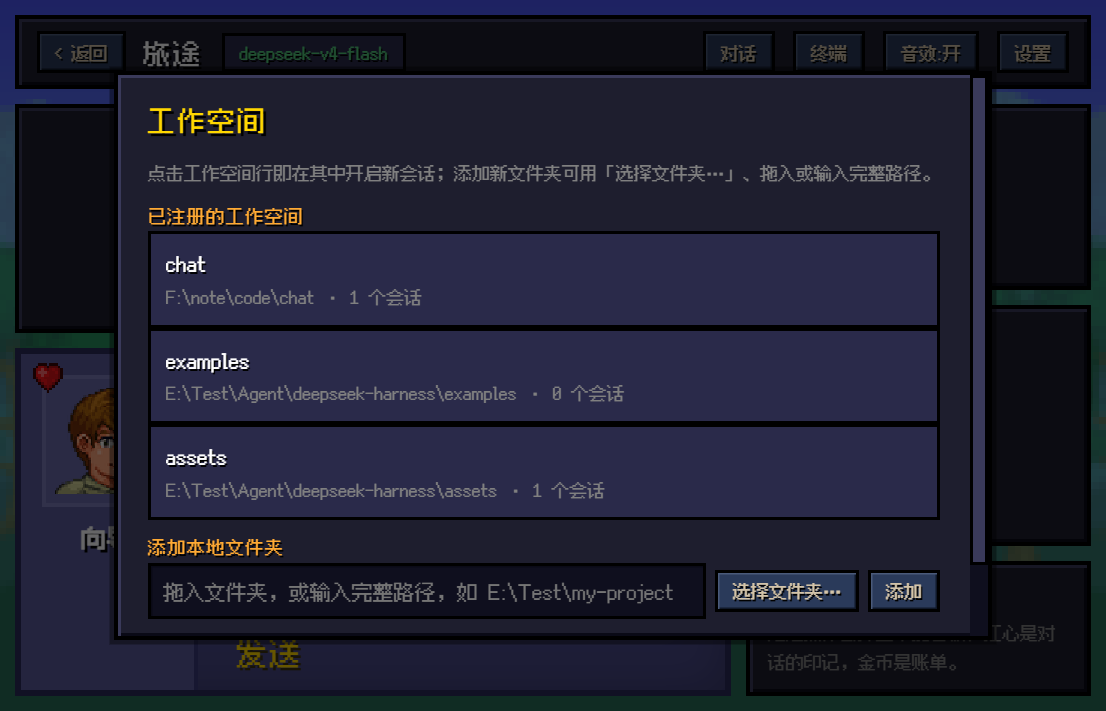
- Lists all registered workspaces (title, full path, session count); click any row to start a new session in that directory (the session name then shows that workspace name, e.g. "assets");
- "添加本地文件夹" (Add local folder) supports three methods: Select Folder… (system dialog), drag-and-drop (auto-parses file:// / Windows paths), or manual input of the full path;
- Because browsers only hand out the folder name from the picker, the theme smart-matches registered directories of the same name and offers a one-click "使用 E:\full\path" backfill.
Desk Pet
Open "人物桌宠" from the title screen to swap the character keeping you company and to command the five desk pets roaming your screen:
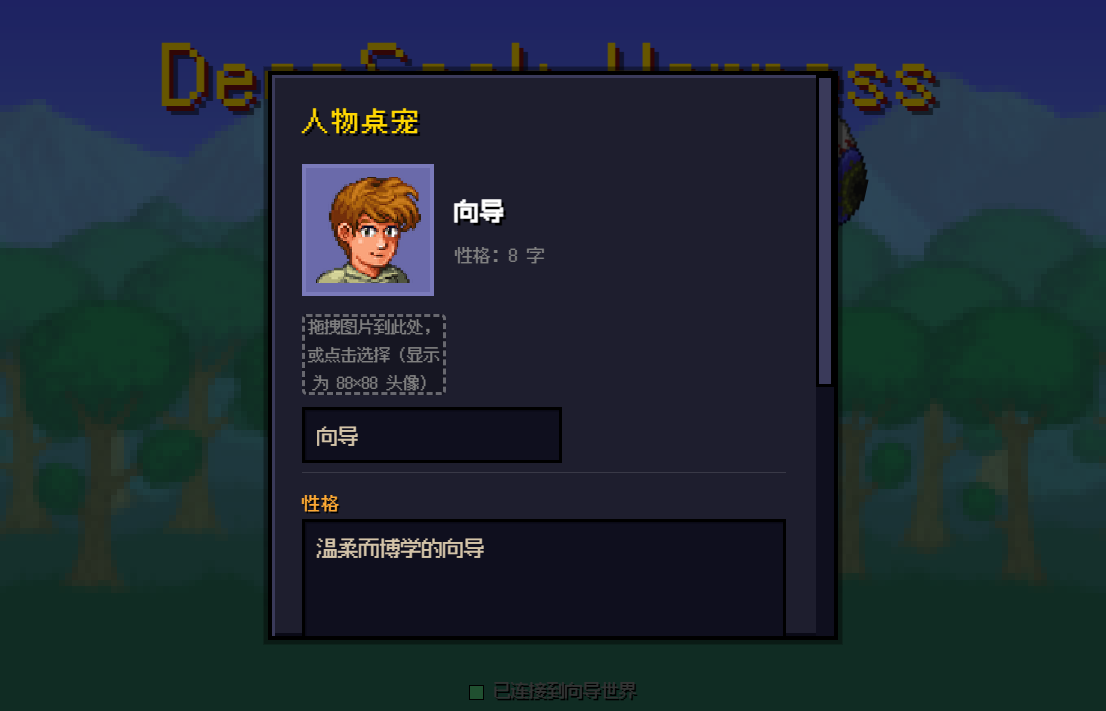
- Portrait upload: drag or click to pick an image (≤16 MB, any size), shown as an 88×88 square portrait (
object-fit: covercenter-crop); stored in IndexedDB and restored after reloads; photos render smoothly while the default pixel art stayspixelatedcrisp; - Name editing: type a new name (≤12 chars, committed on blur or Enter); it updates the dialog nameplate, chat-bubble signatures, the approval slate ("XX想要使用工具"), the question modal title, the welcome line, and the input placeholder;
- Personality: edit the textarea directly, or import from an
.md/.markdownfile (drag-and-drop or click, ≤512KB); the import shows a gold progress bar, and the content is processed (BOM stripped, line endings normalized, trimmed, capped at 64K chars) before saving; hover the dialog portrait to preview the first 120 characters; - Desk pet toggles (five independent switches): each pet gets its own pixel toggle — the Eye of Cthulhu (a wandering, rotating floating eye), King Slime (a bouncing slime with squash-and-stretch), Draedon (a frame-animated flying mechanic), Devourer of Gods (a multi-segment worm crawling in follow-the-leader fashion), and Cryogen (a spinning ice crystal in flight); each pet lives in its own full-screen transparent iframe (
pointer-eventspasses through so nothing is ever blocked), sized to the shared 160px standard (Draedon 133×160 to keep its 5:6 ratio); showing/hiding plays a 0.5s fade transition; each pet's state persists independently in localStorage (terraria.pet.<id>) across reloads; the host page and each iframe talk over postMessage (dsh:petpause/resume commands +dsh:pet-ackconfirmations + adsh:pet-readyhandshake, matched by contentWindow), and closing a pet freezes only its own animation loop to save CPU; - Reset: one click clears the custom portrait, name, and personality, returning to the Guide and the default pixel art.
4. Sound Interaction System (Audio Feedback)
The theme ships an 8-bit style WebAudio engine — pure oscillator synthesis (square wave), no audio files, zero network requests:
| Event | Frequency/Duration | Feel |
|---|---|---|
Assistant reply finished (assistant/message) |
660 Hz / 60 ms | A short "ding", like picking up a coin |
| Tool approval request | 440 Hz / 100 ms | Mid-tone alert drawing attention |
| Ask-user question | 520 Hz / 100 ms | Rising inquiring tone |
| Turn failed / send failed | 180 Hz / 100 ms | Low "thud", the hurt sound |
Design principles:
- Restrained: one beep per event, never looping; streaming (tokens arriving one by one) stays completely silent;
- Switchable: the top-bar "音效:开 / 音效:关" toggle persists in localStorage across reloads;
- Fail-safe: the whole playback path is wrapped in
try/catch— silent environments (autoplay policy blocks, missing audio devices) are ignored without ever throwing.
Background Music (Custom BGM)
A custom-BGM system independent of the sound-effect engine:
- Upload: drag or click in the settings modal to pick an audio file (MP3/WAV/OGG/FLAC/M4A/AAC/OPUS, ≤64 MB); it is stored in IndexedDB (the same database as video wallpapers, bypassing the 5 MB localStorage cap) and restored automatically after reloads;
- Playback: looped through an
<audio>element; the 0–100 volume slider adjusts in real time and persists in localStorage; the top-bar "音乐:开/关" and the in-settings "播放/暂停" stay in sync; - Autoplay policy: browsers require one page interaction before any sound — if the music doesn't resume by itself after a reload, click anywhere on the page and it picks up;
- Removal: "移除音乐" clears the BGM from IndexedDB and stops playback, returning to a silent world.
5. Hidden Easter Eggs (Narrative Interaction)
A consistent adventure narrative is woven through the interaction details for observant players to discover:
- Opening line: every new session begins with — "欢迎来到泰拉瑞亚!我是你的向导。" (Welcome to Terraria! I am your Guide.) — and follows a renamed character's new name.
- Your name is "Adventurer": user messages are never signed "Me" or "User" — always 冒险者, the person standing across from the Guide.
- HUD Guide tip (a quiet hint at the mechanics): "危险操作会弹出审批石板;红心是对话的印记,金币是账单。" — hearts = the emblem on dialog bubbles, coins/the bill = the token-usage stats, which now live in the HUD's Guide-tip panel instead of a per-reply line.
- The connection's worldview: a live socket reads "已连接到向导世界" (connected to the Guide's world); a dropped one reads "连接已断开,重连中…" — WebSocket reconnection told as a world bond.
- The difficulty lexicon: there is no "standard/code/minimal" in mode select — only Journey, Softcore, Mediumcore, Hardcore. Pick Softcore and the side panel quotes the game verbatim: "软核人物死亡时会掉落金钱。" (Softcore characters drop coins on death.) — while it actually switches the Code Mode SDK preset.
- "旅程被中断": when you manually stop a generation, the system line doesn't say "cancelled" — it says "the journey was interrupted".
- Desk Pet: the title-screen "人物桌宠" swaps the character living in the dialog box — drag or click to upload a photo as the portrait (any size, shown as 88×88; photos render smooth while the default pixel art stays crisp), and renaming updates the chat signature, approval slate, welcome line, and input placeholder all at once; the "性格" (personality) section accepts hand-written descriptions or imports them from an .md file; the "桌宠" section gives all five pets their own toggle — Eye of Cthulhu, King Slime, Draedon, Devourer of Gods, and Cryogen — release whichever you fancy, or let them all out for a full boss parade across your screen.
- The eternal walker: the little gif in the mode-select header never stops walking — as if waiting for you to pick a difficulty and set off together.
6. Performance & Accessibility Guardrails
Performance
| Optimization | Approach |
|---|---|
| Zero-framework runtime | The whole UI is vanilla DOM manipulation — no React/Vue runtime. The build output is one 98 KB HTML plus static assets |
| Single-file pixel font | The Fusion Pixel woff2 loads once and serves the whole site, no FOIT flicker |
| Wallpaper auto-compression | Uploaded images are scaled to a 1920px max edge at JPEG quality 85, keeping localStorage usage bounded |
| Video & music via IndexedDB | Live wallpapers (≤512 MB) and custom BGM (≤64 MB) both live in IndexedDB, bypassing the 5 MB localStorage cap; referenced through URL.createObjectURL with revokeObjectURL cleanup on change |
| Cheap crisp rendering | image-rendering: pixelated upscales low-res art with no filtering — near-zero GPU cost |
| Local message updates | Streaming only mutates one bubble's textContent, never re-flowing the list |
Accessibility Guardrails
- Contrast: all body text is light-on-dark (parchment white
#f4f3e6on deep blue#2e3692); key actions (Send/Save) are gold-highlighted buttons; - Audio can be muted: the sound system has a master switch — no forced auditory feedback;
- Approval guardrail: tools default to manual confirmation — dangerous operations pop an approval tablet requiring a human nod; auto-allow is an explicit opt-in with a "use with caution" warning on the button;
- Graceful degradation: if IndexedDB is unavailable the video wallpaper silently falls back to a static one; a dropped WebSocket auto-reconnects with a clear status; every RPC failure surfaces a toast instead of being swallowed.
7. Project Maintenance (Uninstall, Structure & License)
Repository Structure (a standard dsh plugin package)
git/                      <- this repository = a standard dsh plugin package (GitHub-ready)
├── package.json          <- plugin manifest: package name dsh-theme-terraria, main
│                            entry, dsh.bundle patch declaration, peer dependencies
├── index.js              <- plugin entry: exports apply(ctx), loaded by dsh plugin add
├── cordis.patch.yml      <- bundle patch layer: disables the official web-runtime,
│                            inserts the terraria-theme row
├── web/                  <- the theme frontend dist served by the plugin
│   ├── index.html            the entire theme source (HTML + CSS + JS in one file)
│   ├── forest.png            default forest wallpaper
│   ├── Tree.png              title-screen tree
│   ├── xiangdao.png          Guide portrait
│   ├── heart.png             heart emblem
│   ├── Style_1_male_walking.gif  walking character (mode modal)
│   ├── fusion-pixel-12px.woff2   pixel font
│   ├── favicon.svg           site icon
│   ├── eoc_pet.html          Eye of Cthulhu desk pet (iframe page with postMessage protocol)
│   ├── slimeking_pet.html    King Slime desk pet (iframe page with postMessage protocol)
│   ├── draedon_pet.html      Draedon desk pet (iframe page with postMessage protocol)
│   ├── dog_pet.html          Devourer of Gods desk pet (iframe page with postMessage protocol)
│   ├── cryogen_pet.html      Cryogen desk pet (iframe page with postMessage protocol)
│   └── manifest.webmanifest  PWA manifest
├── screenshots/          <- live screenshots
│   ├── title-screen.png      title screen
│   ├── chat-main.png         main chat interface
│   ├── mode-select.png       mode select modal (character creation)
│   ├── settings.png          settings modal (key/wallpaper/plugins)
│   ├── plugin-manager.png    plugin manager (personal / official groups)
│   ├── plugin-detail.png     plugin detail page (collapsed)
│   ├── plugin-detail-open.png plugin detail page ("contains" expanded)
│   ├── workspace.png         workspace modal
│   └── desk-pet.png          desk pet modal
├── README.md             <- Chinese documentation
├── README_EN.md          <- English documentation (this file)
└── theme.rar             <- legacy manual-install archive (pre-plugin, safe to delete)
Plugin Spec Essentials (apply(ctx) and how it loads)
- Entry module:
package.json'smainpoints atindex.js, which exportsname('terraria-theme') andapply(ctx, config)— exportingapply(ctx)is a hard requirement of the DeepSeek Harness plugin spec, and the reasondsh plugin addcan load this theme correctly; - What apply(ctx) does: it swaps the official
@deepseek-ai/dsh-web-appplugin's frontend dist resolver (WebApp.internals.resolveDistIndex) to point at this package'sweb/index.html, then delegates mounting of the official plugin with the passed config — the theme never reimplements the Web runtime, it only replaces the served frontend; - Patch layer:
package.jsondeclares"dsh": { "bundle": { "patch": "./cordis.patch.yml" } }; ondsh plugin --profile web add, dsh uses it to append this package to the profile'sdsh.profile.bundleslayer list; - Peer dependency:
@deepseek-ai/dsh-web-app ^0.1.0-rc.5, resolved by the dsh installation so the theme shares the official Web runtime's cordis instance.
Common Maintenance Commands
# Edit the theme: edit web/index.html directly (no build step), restart dsh web
# Update the installed theme plugin
dsh plugin --profile web update dsh-theme-terraria
Uninstalling (Restore the Official UI)
dsh plugin --profile web remove dsh-theme-terraria
dsh web   # after restart, the official React frontend is back
The theme mounts and unmounts wholesale through the plugin mechanism — it never modifies any file in the dsh installation, so uninstalling leaves zero residue. Browser-side personalization (wallpaper, background music, sound toggle, approval preference) lives in localStorage / IndexedDB; clearing site data wipes it completely.
Submitting to dsh-plugin.org
- Add the
dsh-plugintopic to the GitHub repository's Topics — the listing crawler uses it to identify this repository as a DSH plugin; - This README already contains the standard install command
dsh plugin --profile web add dsh-theme-terraria, and the plugin entryindex.jsexportsapply(ctx)— both listing requirements are met; - The badge at the top already points to the expected listing page
https://dsh-plugin.org/plugins/10086ggqq/dsh_theme_terraria; if the actual listing URL differs after approval, update the badge link accordingly.
License
- This theme: MIT License (consistent with the DeepSeek Harness repository)
- Fusion Pixel font: under its own open-source license (see the Fusion Pixel Font project)
- Terraria is a registered trademark of Re-Logic. This is an unofficial fan-made skin with no affiliation to Re-Logic; do not use the assets commercially.
Related plugins
dsh-web-ui
 dsh-external
/dsh-web-ui
DSH Web UI 皮肤集合(skins/qq98、ths,热插拔客户端插件包)
dsh plugin --profile web add github:dsh-external/dsh-web-uidsh-wallpaper-engine
 elysia395
/dsh-wallpaper-engine
DSH 网页界面壁纸:把本机 Wallpaper Engine 的 Video/Web 壁纸实时播放到聊天界面后方,Scene 壁纸提取主纹理作为静态帧,支持内容分级/类型过滤、自定义壁纸上传与 iOS 液态玻璃设置窗口。
dsh plugin --profile web add github:elysia395/dsh-wallpaper-enginedsh-deep-whale
 Small-tailqwq
/dsh-deep-whale
DSH Web 鲸鱼娘皮肤系列(深海女仆工坊 maid-atelier)。
dsh plugin --profile web add github:Small-tailqwq/dsh-deep-whalemaid-atelier
Small-tailqwqSmall-tailqwq/dsh-deep-whale/maid-atelier
DSH Web 鲸鱼娘皮肤系列(深海女仆工坊 maid-atelier)。
dsh plugin --profile web add github:Small-tailqwq/dsh-deep-whale#path:/maid-atelierdeepseek-harness-desktop
 ningbainb
/deepseek-harness-desktop
开源Windows桌面客户端和GUI——DeepSeek Harness——零配置安装器,包含Codex、插件、技能、SSH、移动远程访问和11种皮肤。
dsh plugin --profile web add github:ningbainb/deepseek-harness-desktopopen-sea-skin
 d-dev0101
/open-sea-skin
Interactive website · 中文 · Architecture · Release guide
dsh plugin --profile web add github:d-dev0101/open-sea-skin